
Meshy
AI 3DTurn text or images into a starting point for a 3D asset.
Fast concept-to-mesh exploration. Web; an approachable entry point.
Free + paidRead review
Visit official website Independent 3D Software Discovery Platform
Discover the best 3D software, AI tools, printable models, and practical guides — all in one place.

 STL ToolsInspect & measurePrintingPrepare & printModelsDownload & use
A little inspiration. A world of possibilities.
Turn an idea into a starting mesh.
Shape, sculpt and build your next idea.
Prepare your model for the real world.
Find a useful asset. Check its license.
Inspect a mesh and find the next step.
Explore avatars and real-time assets.
Find 3D software by task, budget and experience.
Turn text or images into a starting point for a 3D asset.
Fast concept-to-mesh exploration. Web; an approachable entry point.
Free, open-source modeling, sculpting, animation and rendering.
Organic modeling and detailed mesh control. Windows, macOS, Linux; suited to an experienced workflow.
Slice 3D models into printer instructions with configurable profiles.
Preparing filament prints with a compatible printer profile. Windows, macOS, Linux; an approachable entry point.
Visit official websiteDiscover community models and project notes for 3D printing.
Finding printable projects with maker context. Web; an approachable entry point.
Explore text- and image-led AI 3D asset creation.
Iterating on a visual asset concept. Web; an approachable entry point.
Parametric CAD for dimension-driven parts and manufacturing workflows.
Parts that depend on dimensions and design history. Windows, macOS; suited to an experienced workflow.
Visit official websiteFree includes limited free tiers. Eligibility, export access and license terms can vary. 3D software recommendations are based on fit, never commission.
Compare Meshy’s free attribution terms with paid privacy options, then assess export access and the mesh cleanup your project may need.
Understand Tripo’s text and image workflows, export checks, licensing questions and the work that remains after generation.
Compare 3D printing software: Blender for organic meshes, Fusion for precise parts and Tinkercad for beginner projects.
Editor-selected starting points, not a traffic ranking.
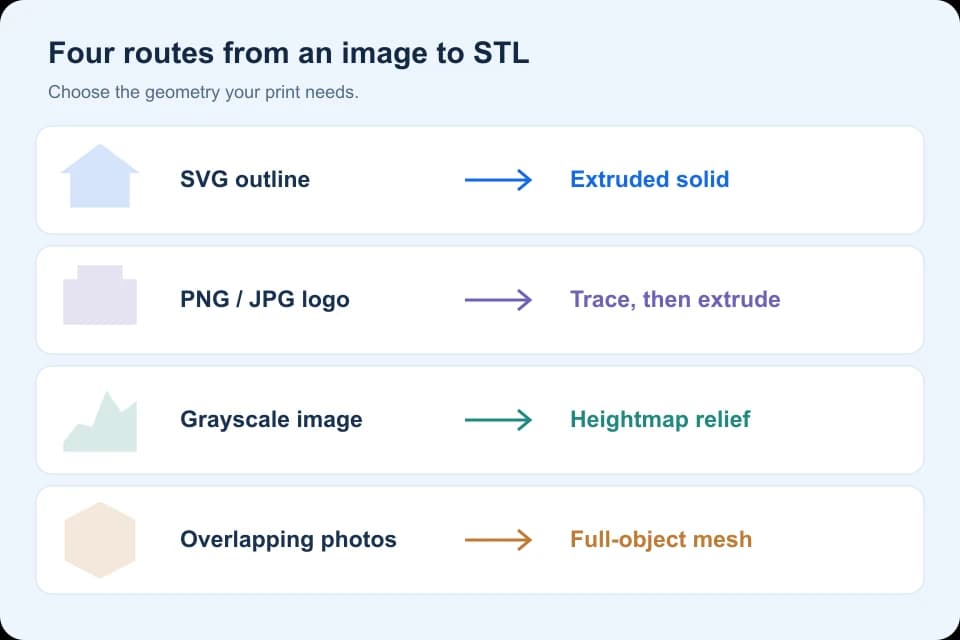
Choose an image-to-STL workflow for PNG, JPG or SVG: trace and extrude an outline, create a grayscale relief, or reconstruct an object from photos.
Follow a model splitting exercise in PrusaSlicer, retain both cut objects and verify their dimensions before adding assembly joints.
Check geometry, scale, wall thickness, supports and licensing before taking a Meshy-generated model into a 3D printer.
Check a file before returning to your 3D software.
Find a starting asset for your 3D software, then check its license.

Useful assets, clear source links and a license-first checklist.
Explore Models

Discover 3D tools, model resources and practical workflow guides.